
Memory Search
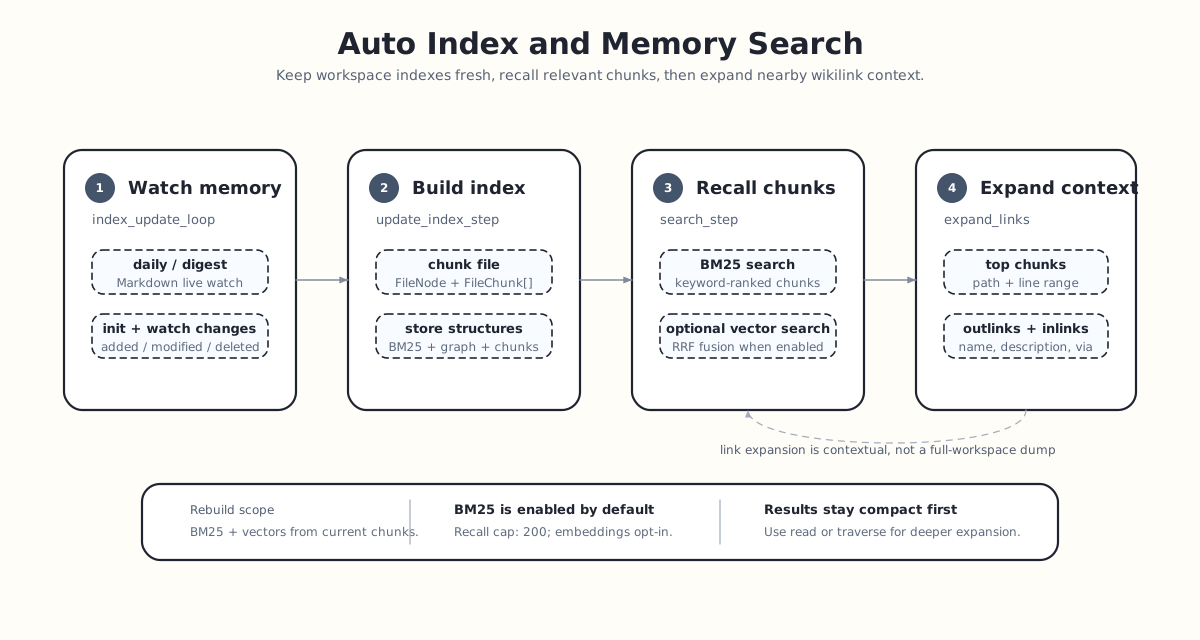
Memory Search is ReMe's memory retrieval entry point. The default background loop continuously builds Markdown under daily/ and digest/ into a searchable chunk index and wikilink graph. At query time, it first recalls the most relevant fragments and then expands context along the bidirectional links of the files containing those fragments. reme reindex rebuilds derived BM25 and embedding indexes from the authoritative in-memory file_chunks; it does not rescan workspace files, rechunk content, or rewrite the wikilink graph.
For the general semantics of file layers, frontmatter, wikilinks, and chunking, see Memory as File. This page focuses on index maintenance and query execution.
workspace files
  ├─ index_update_loop: detect added / modified / deleted
  ├─ update_index_step: file -> FileNode + FileChunk[]
  ├─ file_store: store chunks, BM25, optional embeddings, and the wikilink graph
  └─ search_step: BM25 / vector recall -> RRF fusion -> link expansion
What It Searches
The default index_update_loop watches two memory directories:
daily_dir: daily working memory and session memory cards generated by Auto Memory.digest_dir: long-term distilled digest nodes.
The live watcher handles only the md suffix. A separate resource_watch_loop watches resource_dir, and Auto Resource turns those inputs into daily cards that enter the live index. Manual reindex operates on chunks already accepted by those ingestion paths and therefore does not expand the set of searched files.
How the Index Is Built
Index Update
The background Job index_update_loop maintains the index using configuration from reme/config/default.yaml:
index_update_loop:
  backend: background
  watch_dirs: [daily_dir, digest_dir]
  watch_suffixes: [md]
  steps:
    - backend: init_changes_step
      monitor_type: file_store
      monitor_name: default
      dispatch_steps: [ update_index_step ]
    - backend: watch_changes_step
      dispatch_steps: [ update_index_step ]
init_changes_step runs at startup. It scans the watched directories, compares file mtimes on disk with FileNode.st_mtime values already stored in file_store, calculates added, modified, and deleted changes, and passes context["changes"] to update_index_step.
While the service is running, watch_changes_step takes over. It uses watchfiles.awatch() to watch the same directories, groups file events within a quiet window, and uses coalesce_changes() to collapse repeated events for the same path into one stable batch of changes.
The Step's watch_mode defaults to awatch. Set watch_mode: watch on each relevant watch_changes_step to run watchfiles.watch() on a dedicated thread. This isolates long-lived watchers from AnyIO's shared request-thread limiter when embedding many ReMe applications in one process. Each active watcher still needs one thread. Filtering, batching, and force_polling settings apply to both modes; stopping the job also stops and joins its dedicated watcher.
update_index_step performs the actual index writes:
- Select a file chunker by suffix.
- Parse the file into one
FileNodeand multipleFileChunkobjects. - For an added or modified file, delete its old chunks before upserting the new chunks.
- For a deleted file, remove its records from
file_store,keyword_index, andfile_graph. - When changes exist, dump state to
metadata/so it can be restored on the next startup.
The Markdown chunker parses YAML frontmatter, heading structure, and wikilinks into FileNode, FileChunk, and FileLink objects. For detailed chunking rules, see Memory as File.
Index Optimization
Both BM25 and the FAISS HNSW vector index use tombstone markers instead of physical removal when deleting nodes; too many tombstones degrade search performance. An idle-time optimization mechanism is built in—the optimize_index_cron scheduled job compacts tombstones and rebuilds indexes during off-peak hours:
optimize_index_cron:
  backend: cron
  cron: "0 2 * * *"
  steps:
    - backend: optimize_index_step
By default it runs at 2:00 AM daily; adjust the cron expression to customize the schedule.
What file_store Contains
The default file_store.default backend is local:
file_store:
  default:
    backend: local
    embedding_store: ""
    keyword_index: default
    file_graph: default
It combines three kinds of capability:
| Part | Default state | Purpose |
|---|---|---|
file_chunks | Enabled | Store FileChunk text, line numbers, scores, and optional embeddings. |
keyword_index.default | Enabled | BM25 inverted index where chunk ID is the document ID. |
file_graph.default | Enabled | Store FileNode objects and wikilink edges. |
embedding_store | Disabled | When enabled, generate embeddings for chunks and support vector recall. |
Out of the box, search therefore uses primarily BM25 plus link expansion. After setting embedding_store: default, SearchStep runs vector and keyword recall together.
The embedding store accepts health_check_timeout for its startup probe. A temporary failure skips the current vector backfill while keeping BM25 available; a later successful provider request resumes the missing-vector backfill automatically.
Embedded integrations that have already verified a provider can call resume_embedding(verified=True) to repair missing vectors in the same vector space. Vector-space changes must use the explicit reindex job with scope: embedding; vector search remains unavailable until that job finishes successfully. Use scope: bm25 to rebuild only keyword search, or scope: tag to rebuild the optional tag index from the current file graph. scope: all rebuilds BM25 first, then embeddings, and finally tags. BM25 and embedding rebuilds use the current file_chunks snapshot; the tag rebuild uses FileNode frontmatter from the file graph.
Vector Index Backends
With embeddings enabled, file_store.default.backend can be local, zvec, or faiss. local scans vectors linearly; zvec uses an in-process HNSW index with native vector updates and deletes; faiss uses a FAISS HNSW index. The latter two store rebuildable vector indexes. Memory files and ReMe's chunk data remain the source of truth.
To use Zvec or FAISS, first configure as_embedding and embedding_store as shown in Configuration. Then set file_store.default.embedding_store to default and file_store.default.backend to zvec or faiss. The core installation includes both dependencies; the default configuration still uses local with embeddings disabled.
How to Search
The search Job is also configured in default.yaml:
search:
  backend: base
  description: "Hybrid workspace search (vector + BM25, RRF-fused)."
  parameters:
    query: string
    limit: integer
    min_score: number
    start_date: string
    end_date: string
  steps:
    - backend: search_step
      vector_weight: 0.7
      candidate_multiplier: 5.0
      expand_links: true
      max_links_per_direction: 10
Start the service in one terminal and leave it running:
reme start config=defaultFrom another terminal, call the running service:
reme search query="recent discussions about indexing" limit=5Use start_date and end_date for inclusive YYYY-MM-DD filtering:
reme search query="index regression" start_date=2026-06-01 end_date=2026-06-20 limit=10search_step executes in this order:
flowchart LR
    A["query + limit"] --> B["candidates = min(200, limit * candidate_multiplier)"]
    B --> C["file_store.vector_search(...)"]
    B --> D["file_store.keyword_search(...)"]
    C --> E["RRF fusion"]
    D --> E
    E --> F["min_score filter"]
    F --> G["truncate to limit"]
    G --> H["expand_links(...)"]
    H --> I["Response.answer + metadata"]
If only BM25 has results, the BM25 ranking is returned directly. If only vector search has results, the vector ranking is returned directly. When both have results, they are fused with RRF. RRF does not compare BM25 and cosine scores directly; it compares ranks in the two result lists:
fused_score = vector_weight / (60 + vector_rank)
            + keyword_weight / (60 + keyword_rank)
The default vector_weight=0.7 gives semantic recall more weight when embeddings are enabled, while keyword search can still promote chunks with exact term matches.
Score thresholds
Keep min_score=0 (the default) for normal hybrid search and use limit to select the top results. Positive min_score values filter the returned score before truncation, using the scale of the branches that actually returned hits for that query:
| Branches with hits | Score compared with min_score |
|---|---|
| Vector only | Native vector-backend score; its range depends on the backend |
| BM25 only | Native BM25 score, without a fixed upper bound |
| Both | Weighted RRF rank score, at most 1/61 (approximately 0.01639) |
RRF scores express rank contributions, not normalized relevance or probabilities. The maximum assumes the same chunk ranks first in both lists; a vector-only contribution with the default weight is at most 0.7/61. Changing vector_weight changes individual contributions, while the two weights still sum to 1. The score scale can change between queries when one branch has no hits, so a single positive threshold is not comparable across all modes. For example, min_score=0.05 removes every hybrid result even if its native vector or BM25 score is high. Search logs a warning when both branches have hits and the threshold exceeds 1/61. The threshold is still applied: the warning does not lower it or restore filtered results.
How BM25 Works
keyword_search() calls keyword_index.retrieve(query, limit). Each chunk is a document in the BM25 index:
doc_idisFileChunk.id.contentisFileChunk.text.- The tokenizer splits text into tokens.
- The inverted index records which chunks contain each token and its term frequency within each chunk.
- A query scores only the posting lists matching its tokens and returns the highest-scoring chunk IDs.
When a file changes, LocalFileStore.upsert() first removes the BM25 documents corresponding to the file's old chunk_ids and then adds the new chunk text. Deletion is lazy; the index can later be compacted with optimize.
Progressive Expansion
"Progressive" in Memory Search does not mean putting the entire repository into one result. Retrieval expands in three layers:
- Chunk recall: return only the
limitmost relevant text fragments. - File location: each result includes
path:start_line-end_line. Pass the path and line bounds separately aspath,start_line, andend_linewhen callingread; the range is not part of thepathvalue. - Link neighbors: call
expand_links()for each matched file and expand at mostmax_links_per_directionoutlinks and inlinks.
Expansion data comes from file_graph rather than rescanning files:
matched chunk
  -> chunk.path
  -> file_store.get_outlinks(path)
  -> file_store.get_inlinks(path)
  -> file_store.get_nodes(neighbor_paths)
  -> render neighbor path, name, description, and anchor
This keeps search results short while still showing which long-term nodes, resources, or other daily notes a memory connects to. If a result is worth pursuing, use read path=... to open the source or traverse path=... depth=2 to continue along the wikilink graph.
Return Format
SearchStep writes results in two places:
response.answer: human-readable text. Each matched block contains its path, line numbers, score, and chunk content, followed by outlinks and inlinks.response.metadata: structured programmatic results containingresults,link_expansion, andcounts.
Typical text structure:
========== daily/2026-06-20/retrieval-regression.md:12-28 [score=0.0317 keyword=4.8120] ==========
...matched memory fragment...
  outlinks (2):
    -> digest/indexing.md  name="Indexing"  description="..."
  inlinks (1):
    <- daily/2026-06-19.md  name="..."
counts reports how many vector and keyword candidates were recalled and how many results were ultimately returned. With embeddings disabled by default, vector is usually 0 and hybrid is false.